# Bulk Update PTR Records

#### Overview

Use <span class="font-semibold" data-streamdown="strong">Bulk PTR update</span> when you need the <span class="font-semibold" data-streamdown="strong">same kind of change</span> on <span class="font-semibold" data-streamdown="strong">many IPv4 addresses</span> at once — for example, after a migration, when standardising hostnames for mail servers, or aligning reverse DNS across a range. Single-address changes can stay in the normal row editor or PTR modal.

#### Before you start

- Each <span class="font-semibold" data-streamdown="strong">PTR</span> must be a valid <span class="font-semibold" data-streamdown="strong">FQDN</span> (for example `<span class="md-inline-path-filename">mail.example.com</span>`, not a single word without a domain).
- Best practice: the hostname you set should have <span class="font-semibold" data-streamdown="strong">forward DNS</span> (usually an <span class="font-semibold" data-streamdown="strong">A</span> record) pointing to <span class="font-semibold" data-streamdown="strong">that same IP</span>, so forward and reverse match.
- Only IPs that appear under <span class="font-semibold" data-streamdown="strong">your account</span> in <span class="font-semibold" data-streamdown="strong">IP Address Management</span> can be updated. Anything else is rejected as <span class="font-semibold" data-streamdown="strong">not yours</span>.
- Maximum <span class="font-semibold" data-streamdown="strong">500</span> IP → hostname pairs <span class="font-semibold" data-streamdown="strong">per batch</span>. If you have more, split into multiple runs.

#### Open the bulk tool

1. Sign in to the NOC.
2. Open <span class="font-semibold" data-streamdown="strong">IP Address Management</span>.
3. Click <span class="font-semibold" data-streamdown="strong">Bulk PTR update</span> (toolbar at the top of the main table).

##### Step 1 — Compose

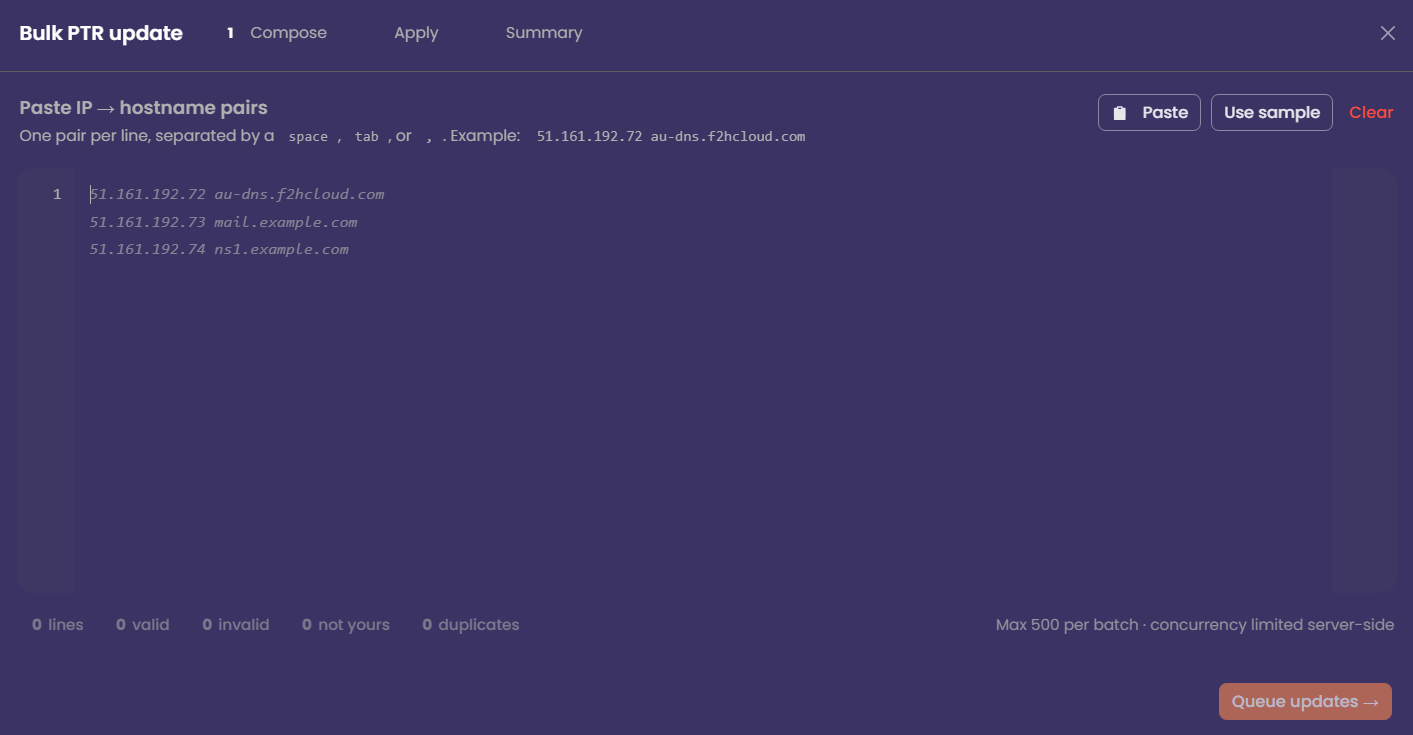
1. In the editor, paste <span class="font-semibold" data-streamdown="strong">one pair per line</span>.
2. On each line, put the <span class="font-semibold" data-streamdown="strong">IPv4</span> first, then the <span class="font-semibold" data-streamdown="strong">hostname</span>, separated by a <span class="font-semibold" data-streamdown="strong">space</span>, <span class="font-semibold" data-streamdown="strong">tab</span>, or <span class="font-semibold" data-streamdown="strong">comma</span>.

[![NoCIPBulk.png](https://docs.f2h.cloud/uploads/images/gallery/2026-04/scaled-1680-/nocipbulk.png)](https://docs.f2h.cloud/uploads/images/gallery/2026-04/nocipbulk.png)

Example:

```
203.0.113.10 mail.example.com
203.0.113.11 smtp.example.com
203.0.113.12,ns1.example.net
```

<div class="composer-message-codeblock" id="bkmrk--1"><div class="ui-code-block"><div class="ui-code-block-content"><div class="ui-scroll-area" data-direction="horizontal" data-visibility="hover"><div class="ui-scroll-area__viewport"><div class="ui-scroll-area__content"><div class="ui-default-code ui-code-block-default-code"><div class="ui-default-code__content"><div class="ui-default-code__line"><div class="ui-default-code__line-content">  
</div></div></div></div></div></div></div></div></div></div>3. Use <span class="font-semibold" data-streamdown="strong">Paste</span> if you are copying from a spreadsheet or text file. <span class="font-semibold" data-streamdown="strong">A sample</span> can show the expected shape if you are unsure. <span class="font-semibold" data-streamdown="strong">Clear</span> wipes the editor.
4. Watch the <span class="font-semibold" data-streamdown="strong">line counts</span> at the bottom: <span class="font-semibold" data-streamdown="strong">valid</span>, <span class="font-semibold" data-streamdown="strong">invalid</span>, <span class="font-semibold" data-streamdown="strong">not yours</span>, <span class="font-semibold" data-streamdown="strong">duplicates</span>. 
    - Fix <span class="font-semibold" data-streamdown="strong">invalid</span> lines (bad IP or bad hostname shape).
    - Remove or correct lines marked <span class="font-semibold" data-streamdown="strong">not yours</span>.
    - <span class="font-semibold" data-streamdown="strong">Duplicates</span>: only one update per IP should win; clean extra lines if the count surprises you.
5. When you have at least one <span class="font-semibold" data-streamdown="strong">valid</span> owned line, and you are ready, continue to the next step (<span class="font-semibold" data-streamdown="strong">Queue updates</span> or equivalent).

##### Step 2 — Apply

The NOC <span class="font-semibold" data-streamdown="strong">queues</span> each change and applies it with <span class="font-semibold" data-streamdown="strong">limited concurrency</span> (server-side). You will see:

- A <span class="font-semibold" data-streamdown="strong">progress</span> bar and counts for queued, running, succeeded, and failed.
- Optionally <span class="font-semibold" data-streamdown="strong">cancel remaining</span> if you need to stop mid-run.

<span class="font-semibold" data-streamdown="strong">Do not close the browser tab</span> until the run finishes unless you accept that some rows may still be in flight.

##### Step 3 — Summary

Review <span class="font-semibold" data-streamdown="strong">updated</span>, <span class="font-semibold" data-streamdown="strong">failed</span>, and <span class="font-semibold" data-streamdown="strong">cancelled</span> counts and duration.

- <span class="font-semibold" data-streamdown="strong">Retry failed only</span> — runs again for lines that errored (after you fix the underlying issue if needed).
- <span class="font-semibold" data-streamdown="strong">Copy failed as CSV</span> — handy for support tickets or a second attempt in a spreadsheet.
- <span class="font-semibold" data-streamdown="strong">Close</span> when you are done.

#### Verify

PTR and DNS propagate at different speeds everywhere. After a successful run:

- Use your usual <span class="font-semibold" data-streamdown="strong">reverse DNS</span> lookup (or `dig -x` / online checker) on a few addresses.
- Confirm <span class="font-semibold" data-streamdown="strong">A</span> records still match the names you set.

---

#### Common issues

<div class="ui-scroll-area" data-direction="horizontal" data-visibility="hover" id="bkmrk-what-you-see-what-to"><div class="ui-scroll-area__viewport"><div class="ui-scroll-area__content"><table><thead class="bg-muted/80" data-streamdown="table-header"><tr class="border-border border-b" data-streamdown="table-row"><th class="whitespace-nowrap px-4 py-2 text-left font-semibold text-sm" data-streamdown="table-header-cell">What you see</th><th class="whitespace-nowrap px-4 py-2 text-left font-semibold text-sm" data-streamdown="table-header-cell">What to do</th></tr></thead><tbody class="divide-y divide-border bg-muted/40" data-streamdown="table-body"><tr class="border-border border-b" data-streamdown="table-row"><td><div class="md-table-cell-content">Many <span class="font-semibold" data-streamdown="strong">not yours</span></div></td><td><div class="md-table-cell-content">Those IPs are not in your inventory in this screen; fix the list or assign services correctly first.</div></td></tr><tr class="border-border border-b" data-streamdown="table-row"><td><div class="md-table-cell-content"><span class="font-semibold" data-streamdown="strong">Invalid</span> count high</div></td><td><div class="md-table-cell-content">Check for typos, missing dots in FQDNs, or spaces inside the hostname.</div></td></tr><tr class="border-border border-b" data-streamdown="table-row"><td><div class="md-table-cell-content">Some <span class="font-semibold" data-streamdown="strong">failed</span></div></td><td><div class="md-table-cell-content">Open the <span class="font-semibold" data-streamdown="strong">API activity</span> toggle to check the logs. Retry failed after fixing DNS or transient errors.</div></td></tr><tr class="border-border border-b" data-streamdown="table-row"><td><div class="md-table-cell-content">Second batch needed</div></td><td><div class="md-table-cell-content">Stay within <span class="font-semibold" data-streamdown="strong">500</span> lines per run; start a new bulk session for the rest.</div></td></tr></tbody></table>

</div></div></div>---

#### Tips

- Sort and dedupe your source file <span class="font-semibold" data-streamdown="strong">before</span> pasting to avoid duplicate IP lines.
- For a cutover, update <span class="font-semibold" data-streamdown="strong">forward DNS first</span>, then bulk PTR, or do both in close sequence and recheck.
- Keep a copy of the file you pasted — the summary’s export CSV is best for <span class="font-semibold" data-streamdown="strong">failures</span>, not always a full audit of successes.