# Manage PTR Records

#### Overview

<span class="font-semibold" data-streamdown="strong">PTR</span> (pointer) is reverse DNS: the name the internet sees when something looks up your <span class="font-semibold" data-streamdown="strong">public IPv4</span> address. Many mail servers and some services expect your PTR to look professional (often a <span class="font-semibold" data-streamdown="strong">fully qualified domain name</span>, or FQDN, such as `<span class="md-inline-path-filename">mail.example.com</span>`).

For mail and reputation, it is best practice that <span class="font-semibold" data-streamdown="strong">PTR and forward DNS agree</span>: the IP’s PTR should point at a hostname that, in turn, <span class="font-semibold" data-streamdown="strong">resolves forward (A record) back to the same IP</span>. If they do not match, some recipients may defer or reject mail or treat the host as less trustworthy.

You manage PTR in the NOC portal on <span class="font-semibold" data-streamdown="strong">IP Address Management</span> for addresses <span class="font-semibold" data-streamdown="strong">on your account</span>. You cannot set PTR for IPs you do not own through this page.

##### Before you change anything

1. <span class="font-semibold" data-streamdown="strong">Decide on the hostname</span> you want (an FQDN you control).
2. <span class="font-semibold" data-streamdown="strong">Create/update forward DNS</span> so that the hostname’s <span class="font-semibold" data-streamdown="strong">A record</span> points to <span class="font-semibold" data-streamdown="strong">this same IPv4</span>. Do this in your DNS hosting (zone for the domain), not only in the portal.
3. <span class="font-semibold" data-streamdown="strong">Wait for DNS to propagate</span> if you just created the record (often minutes, sometimes longer).
4. In the portal, open <span class="font-semibold" data-streamdown="strong">IP Address Management</span>, find the IP (search, service filter, or <span class="font-semibold" data-streamdown="strong">Ctrl+K</span>), and expand the row or use <span class="font-semibold" data-streamdown="strong">Update reverse DNS</span> where offered.

#### Set a custom PTR (single address)

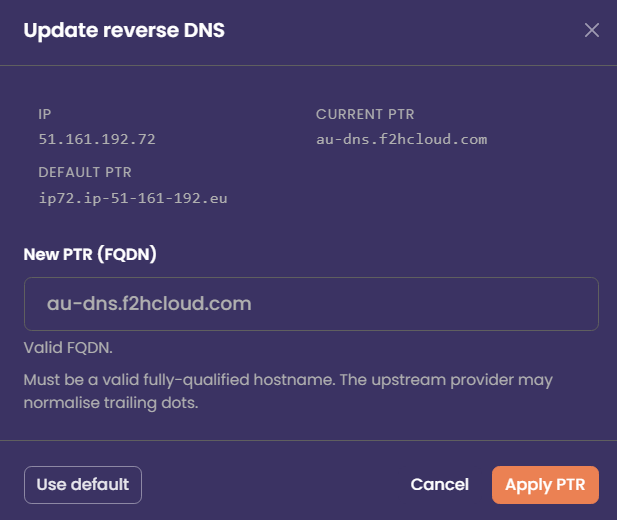
1. Open the IP’s <span class="font-semibold" data-streamdown="strong">PTR</span> flow (expanded row, <span class="font-semibold" data-streamdown="strong">Save</span> after editing the PTR field, or the <span class="font-semibold" data-streamdown="strong">Reverse DNS</span> modal).
2. Enter the <span class="font-semibold" data-streamdown="strong">new PTR</span> as a valid <span class="font-semibold" data-streamdown="strong">FQDN</span> (e.g. `<span class="md-inline-path-filename">smtp.example.com</span>`). Do not use bare words like `mail` without a domain; the portal expects a proper hostname format.
3. Confirm the value matches what you want the world to see <span class="font-semibold" data-streamdown="strong">and</span> that your <span class="font-semibold" data-streamdown="strong">forward DNS (A)</span> for that name already points to this IP.
4. Click <span class="font-semibold" data-streamdown="strong">Apply PTR</span> / <span class="font-semibold" data-streamdown="strong">Save</span>. The portal sends the change to the API; the upstream API system may normalise the name slightly (e.g. trailing dot).
5. After a few minutes, verify with an external tool (reverse lookup on the IP) or `dig -x YOUR.IP` from your own machine.

[![NoCrDNS.png](https://docs.f2h.cloud/uploads/images/gallery/2026-04/scaled-1680-/nocrdns.png)](https://docs.f2h.cloud/uploads/images/gallery/2026-04/nocrdns.png)
#### Reset PTR to the default

1. Open the same IP in <span class="font-semibold" data-streamdown="strong">IP Address Management</span>.
2. <span class="font-semibold" data-streamdown="strong">Use default</span> (modal) or <span class="font-semibold" data-streamdown="strong">Reset</span> (expanded row), depending on which UI you are in.
3. Confirm the action. The PTR returns to the platform <span class="font-semibold" data-streamdown="strong">default</span> for that service/IP.
4. Allow a short time for the change to appear globally, then verify with a reverse DNS lookup if needed.

Use this when you no longer host mail on that IP, you used a temporary hostname, or a custom PTR is causing mismatch warnings.

#### Bulk PTR updates

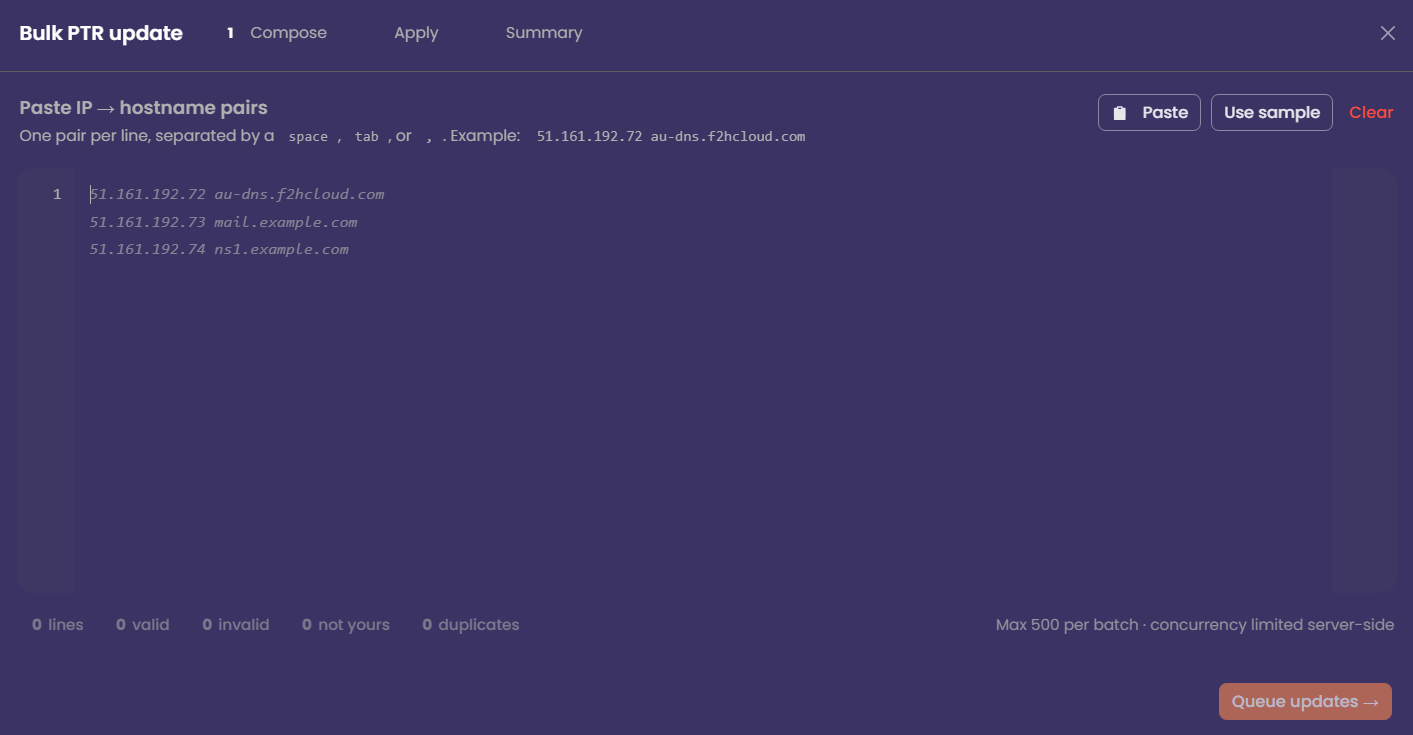
If you must align many addresses at once (e.g. after a migration), open <span class="font-semibold" data-streamdown="strong">Bulk PTR update</span>, paste one <span class="font-semibold" data-streamdown="strong">IP and hostname</span> per line (separated by space, tab, or comma), and review the counts for <span class="font-semibold" data-streamdown="strong">valid</span>, <span class="font-semibold" data-streamdown="strong">invalid</span>, and <span class="font-semibold" data-streamdown="strong">not yours</span> before queuing. Only lines for <span class="font-semibold" data-streamdown="strong">your</span> IPs are applied. The maximum batch size is <span class="font-semibold" data-streamdown="strong">500</span> per run; large jobs are completed in a queue with a summary at the end.

[![NoCIPBulk.png](https://docs.f2h.cloud/uploads/images/gallery/2026-04/scaled-1680-/nocipbulk.png)](https://docs.f2h.cloud/uploads/images/gallery/2026-04/nocipbulk.png)
#### Troubleshooting

<div class="ui-scroll-area" data-direction="horizontal" data-visibility="hover" id="bkmrk-issue-what-to-check-"><div class="ui-scroll-area__viewport"><div class="ui-scroll-area__content"><table style="width: 100%; height: 165.781px;"><thead class="bg-muted/80" data-streamdown="table-header"><tr class="border-border border-b" data-streamdown="table-row" style="height: 29.7969px;"><th class="whitespace-nowrap px-4 py-2 text-left font-semibold text-sm" data-streamdown="table-header-cell" style="width: 33.6046%; height: 29.7969px;">Issue</th><th class="whitespace-nowrap px-4 py-2 text-left font-semibold text-sm" data-streamdown="table-header-cell" style="width: 66.3954%; height: 29.7969px;">What to check</th></tr></thead><tbody class="divide-y divide-border bg-muted/40" data-streamdown="table-body"><tr class="border-border border-b" data-streamdown="table-row" style="height: 46.5938px;"><td style="width: 33.6046%; height: 46.5938px;"><div class="md-table-cell-content"><span class="font-semibold" data-streamdown="strong">Save rejected or “invalid” hostname</span></div></td><td style="width: 66.3954%; height: 46.5938px;"><div class="md-table-cell-content">Use a real FQDN; check length and characters (letters, numbers, dots, hyphens per DNS rules).</div></td></tr><tr class="border-border border-b" data-streamdown="table-row" style="height: 29.7969px;"><td style="width: 33.6046%; height: 29.7969px;"><div class="md-table-cell-content"><span class="font-semibold" data-streamdown="strong">Mail still failing PTR checks</span></div></td><td style="width: 66.3954%; height: 29.7969px;"><div class="md-table-cell-content">Confirm that a record for the PTR name points to <span class="font-semibold" data-streamdown="strong">this</span> IP; wait for DNS TTL/propagation.</div></td></tr><tr class="border-border border-b" data-streamdown="table-row" style="height: 29.7969px;"><td style="width: 33.6046%; height: 29.7969px;"><div class="md-table-cell-content"><span class="font-semibold" data-streamdown="strong">Wrong IP / no permission</span></div></td><td style="width: 66.3954%; height: 29.7969px;"><div class="md-table-cell-content">PTR can only be set for IPs listed under your account on this page.</div></td></tr><tr class="border-border border-b" data-streamdown="table-row" style="height: 29.7969px;"><td style="width: 33.6046%; height: 29.7969px;"><div class="md-table-cell-content"><span class="font-semibold" data-streamdown="strong">Change is slow to show</span></div></td><td style="width: 66.3954%; height: 29.7969px;"><div class="md-table-cell-content">Global DNS caches can delay what you see; wait and test again with a fresh lookup.</div></td></tr></tbody></table>

</div></div></div>#### Quick checklist

- <span aria-disabled="true" class="ui-checkbox" data-size="compact" data-variant="neutral"> [ ] </span> Forward <span class="font-semibold" data-streamdown="strong">A</span> (or appropriate record) points hostname → <span class="font-semibold" data-streamdown="strong">this IPv4</span>
- <span aria-disabled="true" class="ui-checkbox" data-size="compact" data-variant="neutral"> [ ] </span> PTR in the portal is set to <span class="font-semibold" data-streamdown="strong">that same hostname</span> (FQDN)
- <span aria-disabled="true" class="ui-checkbox" data-size="compact" data-variant="neutral"> [ ] </span> Verified with an external reverse lookup after propagation