IP Reputation takes time. You, as the owner of an IP address, are responsible for its reputation from the moment the IP is assigned to you.
An RBL (Real-time Blocklist / DNS blocklist) check asks public blocklist providers whether your public IPv4 is listed. Many mail systems use these lists to decide whether to accept mail. The check in the NOC is a quick, on-demand snapshot — useful when you are troubleshooting delivery or confirming reputation after a cleanup. It is not a full mail-audit or a guarantee that every recipient will accept your mail. Large providers also use their own filters, spam scores, and authentication checks (SPF, DKIM, DMARC, PTR). #### Where to run it 1. Sign in to the NOC. 2. Open IP Address Management. 3. Find the IP (search box, service filter on the left, or Ctrl+K quick jump if your browser supports it). #### Run the check To run an RBL check on your IP address. [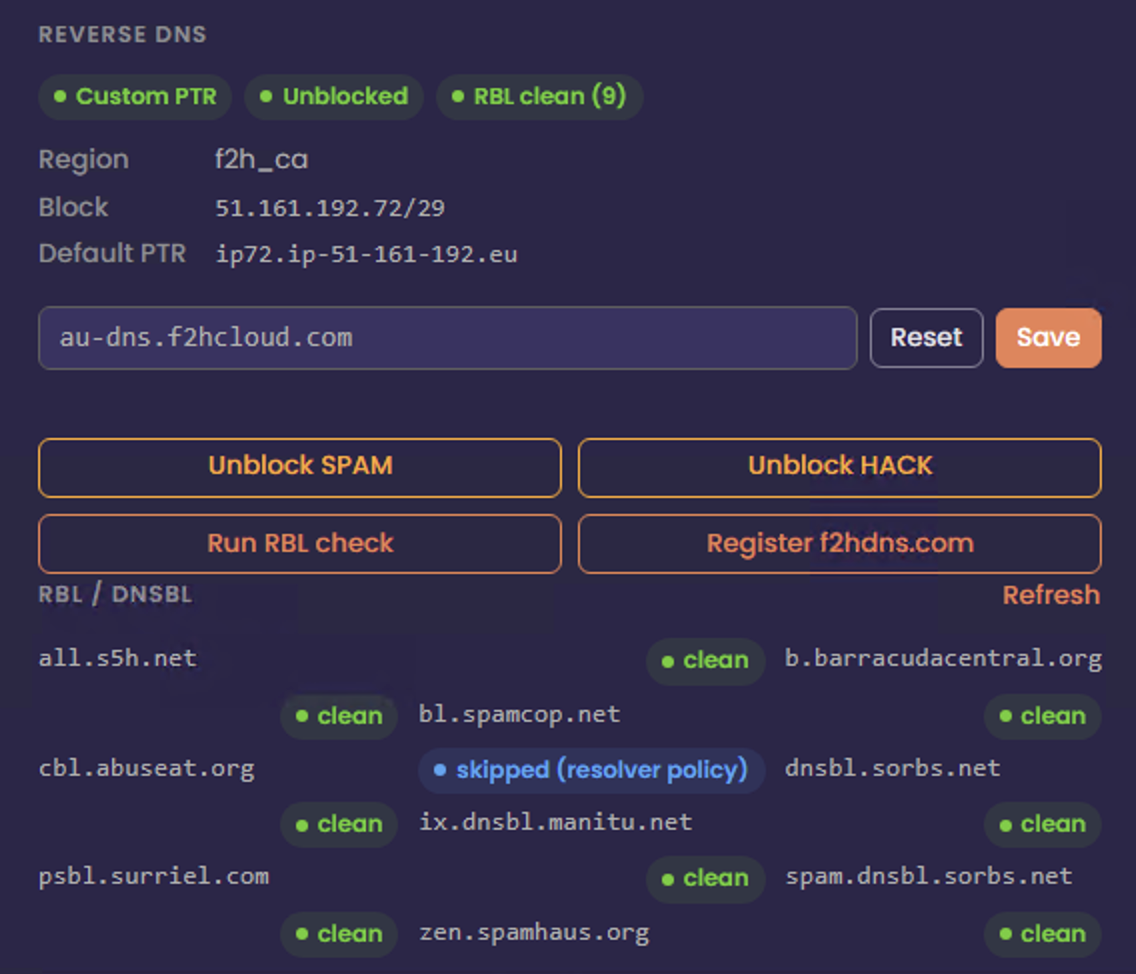](https://docs.f2h.cloud/uploads/images/gallery/2026-05/nocrblcheck.png) ##### From the table (quick action) Click the RBL icon on the row for that address. The UI will request a fresh check for that IP. ##### From the expanded row (detail) Click the row to expand the per-IP panel, then use Run RBL check. Use this when you already have PTR, unblock, or another context open for the same address. #### Read the result - If the address is not on the lists we query, you will see a clean / no listing style result (wording may vary slightly in the UI). - If it is listed, the UI shows how many lists reported a hit and may summarize severity. ``` { "status": "ok", "ip": "51.161.192.72", "rbl": { "zen.spamhaus.org": "ok", "b.barracudacentral.org": "ok", "bl.spamcop.net": "ok", "psbl.surriel.com": "ok", "dnsbl.sorbs.net": "ok", "spam.dnsbl.sorbs.net": "ok", "all.s5h.net": "ok", "ix.dnsbl.manitu.net": "ok", "cbl.abuseat.org": "policy" }, "detail": { "cbl.abuseat.org": "127.255.255.254 (Error: open resolver; https://check.spamhaus.org/returnc/pub/158.69.169.2/)" }, "summary": { "total": 9, "listed": 0, "errors": 1, "policy": 1, "clean": 8 } } ``` Results update the RBL summary chips at the top of the page and badges on rows so you can spot problem IPs at a glance.