
NoC IP Address Management Overview
Overview
The IP Address Management area of the First2Host NOC portal is a single place to see all IPv4 assets tied to your account, manage reverse DNS (PTR), check abuse/block status, run RBL checks, do light reachability checks, and use bulk PTR tools. Actions are sent through the portal’s API layer to a regional worker. Only addresses you own can be changed.
NoC Features

Unified IP inventory
Shows IPv4 addresses that belong to your account in one place: VPS/shared single IPs, dedicated primary IPs, and extra CIDR blocks where applicable. Large blocks may appear as a summary row rather than every host expanded.
Service filter (left rail)
Narrow the table to a single service (hosting line or dedicated assignment). Helpful when you have many IPs and only want to work on one machine or subscription. The rail has its own search so you can find the service by name quickly. Clearing the selection shows everything again.
KPI chips (totals & filters)
Quick counts at the top: how many addresses you have, how many still use the default PTR vs custom, how many are flagged for abuse blocks, and how many were RBL-listed on the last check. Click a chip to filter the table to that slice. Good for spotting mail problems (PTR / RBL) or accounts that need cleanup.
Single PTR (modal & expanded row)
Set reverse DNS to a valid FQDN for one address. You can open the classic modal or edit in the expanded row under the table. The portal shows current PTR, default PTR, and validates the hostname before sending the change. The upstream provider may normalise the value slightly (e.g. trailing dots).
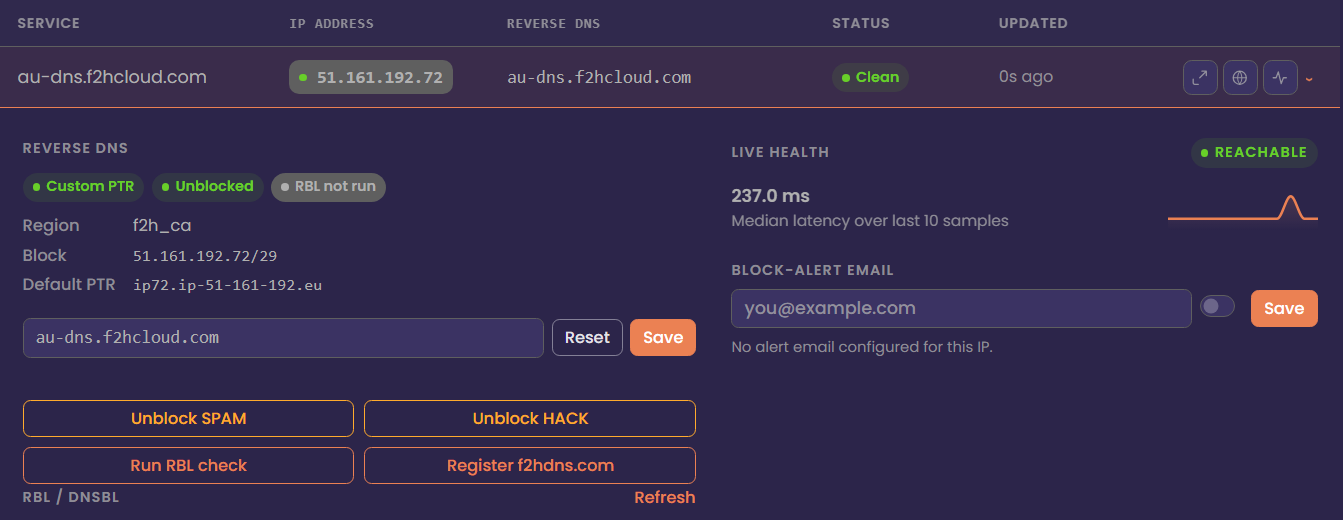
Reset to default PTR
One-click path to put reverse DNS back to the platform default for that IP. Use this after testing mail or when a custom hostname is no longer correct. Saves you from looking up the default string manually. Same ownership rules apply as for any PTR change.
Bulk PTR update
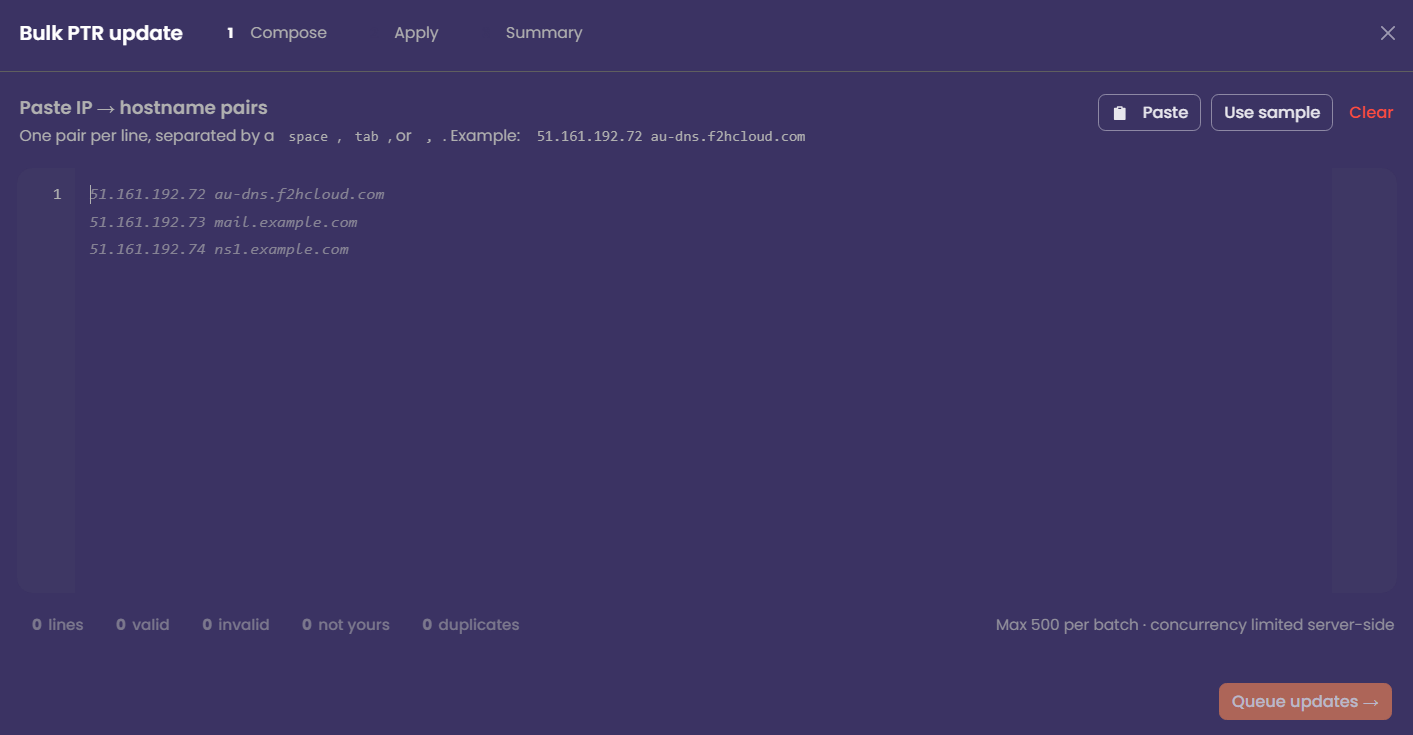
Paste many IP → hostname lines at once (space, tab, or comma between columns). The UI counts valid lines, invalid syntax, duplicates, and addresses not on your account before anything is sent. Up to 500 updates per batch, with a queued apply step and a summary you can retry or export for failures.
Unblock SPAM
When an IP is in a SPAM-related block state, this requests an unblock through the regional API your stack uses. You must own the IP; unowned addresses are rejected immediately.
Unblock HACK
Same idea as SPAM unblock, but for HACK / anti-abuse style blocks. Only shown or relevant when the inventory marks that reason for the address. Again, ownership is enforced server-side before any external API call.
RBL check
Runs an on-demand check against DNS blocklists and shows whether the IP is listed and on how many lists. Results feed the RBL KPI chip and row badges for a quick mail-deliverability sanity check. It’s a point-in-time scan, not continuous monitoring.
This feature is in active development. Consider it experimental.
Ping (live health)
A simple reachability check from the portal’s host to the public IP. Useful to confirm the address answers while you’re troubleshooting routing or firewall—not a replacement for external monitoring or SLA dashboards. The expanded row shows the latest result in context with PTR and abuse info.
Register/manage F2HDNS
Registers or aligns DNS/PTR flows for the f2hdns.com integration exposed in your action API (create, PTR sync, delete as implemented). Use when your workflow relies on that product instead of only editing PTR at the provider. Exact steps in the UI follow whatever the backend returns for success or errors.
Per-IP alert preferences
Optional email alerts per address, stored in the NOC-side preferences table. Let's you turn notifications on or off without changing PTR or blocks. Handy for noisy ranges where you only want mail on specific IPs.
Search & command palette
Search the main table by IP, PTR string, or service name. Ctrl+K (and / ) opens a quick-jump palette to hop to a row fast when you already know the IP. Keyboard navigation (↑ ↓, Enter) works in the table for accessibility and speed.
API activity log
A modal that lists recent actions you triggered. (PTR, bulk jobs, checks, etc.). Useful for support tickets or confirming what ran and whether it succeeded. Filter the log by text when the list gets long.
